By Owen Palmer
Updated November 2026
Garmin Edge interval training is easiest to manage on a dedicated device that can run structured workouts with set work and recovery intervals, show live targets and record every split. Whether you ride, run or want a bike computer that handles both, the right Edge model depends on screen size, button versus touch control, mapping needs and how much performance data you want. The picks below are based on manufacturer specifications, brand reputation and common owner feedback patterns. None of them were tested by us, so check the current listing details before you buy.
Our top picks at a glance
- 1
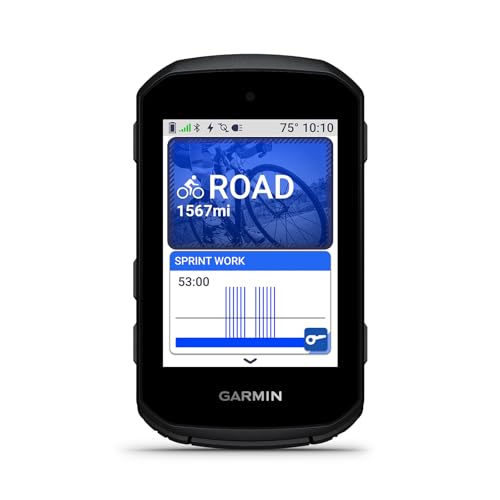 TOP CHOICEBest overallGarmin Edge® 850, Compact GPS Cycling Computer | Vivid Color Display,View on Amazon
- 2TOP CHOICEBest for compact handlebarsGarmin Edge® 550, Compact GPS Cycling Computer | Vivid Color Display,View on Amazon
- 3
 TOP CHOICEBest for power-meter ridersGarmin Edge 1050 Premium Cycling Computer BundleView on Amazon
- 4
 Best for off-road trail routesGarmin Edge MTB Rugged GPS Bike Computer BundleView on Amazon
- 5
 Best for running-focused intervalsGarmin Forerunner 170 Music GPS Running SmartwatchView on Amazon
- 6
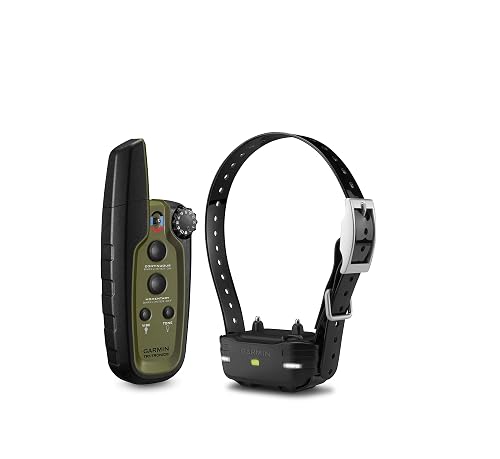 Best budget pickGarmin Sport PRO Dog Training BundleView on Amazon
Our Top Picks
Before the comparison, one note on scope. Several of the listings below are bike computers rather than running watches, and one is a dog training bundle that appears in this set but is not a fitness device at all. We include it so you can see where it falls short for interval work. For runners, the Forerunner entry is the most relevant. For cyclists, the Edge models do the heavy lifting.
Quick Comparison
| Product | Best for | Key feature |
|---|---|---|
| GarminVivid Color Display, Touchscreen Edge 850 | Riders who want the most workout detail | Touchscreen with advanced training insights |
| GarminVivid Color Display, Button Controls Edge 550 | Compact setups and simpler menus | Button controls on a small color display |
| Garmin Edge 1050 Premium Cycling Computer Bundle | Power and cadence sensor users | Large display with sensor integration |
| Garmin Edge MTB Rugged GPS Bike Computer Bundle | Mountain bikers and trail riders | Preloaded full-color trail maps |
| Garmin Forerunner 170 Music GPS Running Smartwatch | Runners doing pace-based intervals | Daily suggested workouts and adaptive plans |
| Garmin Sport PRO Dog Training Bundle | Not a fitness device; listed for comparison | Tone and vibration training collar |
GarminVivid Color Display, Touchscreen, Advanced Training & Performance Insights Edge 850
Garmin Edge® 850, Compact GPS Cycling Computer | Vivid Color Display, Touchscreen, Advanced Training & Performance Insights, Built-In Speaker
Best for: Riders who want the most workout detail
This suits cyclists who build structured sessions in Garmin Connect and want to see work and rest targets clearly on a bright screen while riding. Its touchscreen makes changing screens and workout steps quicker when your hands are on the bars.
Key specs
- Color display with touchscreen control
- Built-in speaker for alerts
- Compact GPS cycling computer form factor
- Advanced training and performance insights
Pros
- Touchscreen speeds up navigating between interval screens
- Clear color layout for target and lap data
- Built-in speaker helps with audible interval cues
Cons
- Touch controls can be less practical with gloves in cold weather
- Full feature set takes time to learn
Bottom line: The strongest all-around choice for road cyclists who want detailed interval feedback and a touch interface.
GarminVivid Color Display, Button Controls, Advanced Training & Performance Insights Edge 550
Garmin Edge® 550, Compact GPS Cycling Computer | Vivid Color Display, Button Controls, Advanced Training & Performance Insights
Best for: Compact setups and simpler menus
This is a good fit for riders who prefer physical buttons, want a smaller unit on the handlebar, and still need to run structured intervals with set durations and targets.
Key specs
- Color display with button controls
- Compact GPS cycling computer form factor
- Advanced training and performance insights
Pros
- Button controls work reliably with gloves and in wet conditions
- Small footprint suits crowded handlebars
- Generally simpler menus than touchscreen-first units
Cons
- Navigating deeper workout menus takes more button presses
- Smaller screen means less data on one page
Bottom line: Pick this if you value tactile controls and a compact unit over the largest possible display.
Garmin Edge 1050 Premium Cycling Computer Bundle
Wearable4U – Garmin Edge 1050 Premium Cycling Computer, Vivid Color Touchscreen Display, Built-in Speaker, Advanced Training with Garmin Speed and Cadence Sensors and Power Bank Bundle
Best for: Power and cadence sensor users
This suits riders who train with a power meter or cadence sensor and want interval targets tied to those metrics. The bundle includes a power bank, which many owners find useful for longer rides and mapping use.
Key specs
- Vivid color touchscreen display
- Built-in speaker
- Compatible with Garmin speed and cadence sensors
- Bundled power bank
Pros
- Large display suits detailed interval and sensor data
- Sensor compatibility supports power-based intervals
- Power bank adds battery margin on long sessions
Cons
- Larger size may not fit small handlebar mounts
- Sensors are sold separately and add to the setup
Bottom line: A good match for data-focused cyclists who already own or plan to add speed, cadence or power sensors.
Garmin Edge MTB Rugged GPS Bike Computer Bundle
GarminFor Cycling, Training & Navigation | Preloaded Full-Color Trail Maps | Includes Cleaning Kit Edge MTB Rugged GPS Bike Computer Bundle
Best for: Mountain bikers and trail riders
This suits riders who mix trail interval efforts with navigation on unfamiliar routes. The preloaded full-color trail maps and included cleaning kit reflect its off-road focus.
Key specs
- Rugged GPS bike computer design
- Preloaded full-color trail maps
- Training and navigation functions
- Includes a cleaning kit
Pros
- Preloaded trail maps help with route navigation off-road
- Rugged build is designed for dirt and rain
- Cleaning kit is useful after muddy rides
Cons
- Map-first design is more than most interval-only riders need
- Rugged units are often bulkier than road-focused computers
Bottom line: Best for mountain bikers who want intervals and navigation on one device.
Garmin Forerunner 170 Music GPS Running Smartwatch
GarminGPS Running Smartwatch, Music On Your Wrist, Pace & Distance, Daily Suggested Workouts, Garmin Coach, Adaptive Training Plans Forerunner® 170 Music, 43mm, Whitestone/Cloud Blue
Best for: Runners doing pace-based intervals
This is the most direct option for runners. Garmin’s running watches support structured workouts with pace and distance targets, and this model adds daily suggested workouts and adaptive training plans, which suit runners who want guidance instead of building every session by hand.
Key specs
- 43mm case size
- Music playback from the wrist
- Pace and distance tracking
- Daily suggested workouts and Garmin Coach adaptive training plans
Pros
- Structured interval workouts with pace targets
- Adaptive plans adjust as your training develops
- Music on the wrist suits runs without a phone
Cons
- Small screen makes dense interval data harder to scan mid-run
- Coaching features require a Garmin Connect account to get the most out of them
Bottom line: The best choice here for runners who want guided interval plans and a single device for workouts and music.
Garmin Sport PRO Dog Training Bundle
Garmin Sport PRO Bundle, Dog Training Collar and Handheld, 1-Handed Training of Up to 3 Dogs, Tone and Vibration
Best for: Not a fitness device; included for comparison only
This product is a dog training collar and handheld controller that uses tone and vibration cues. It has no role in interval running or cycling, so it is listed here only so you can see how far it sits from what this guide covers. Owners who arrived here looking for an Edge device should pick one of the other five entries.
Key specs
- One-handed control of up to three dogs
- Tone and vibration training modes
- Handheld controller with collar unit
Pros
- Clear controls for dog training sessions
- Covers multiple dogs with one handheld
- Tone and vibration options give flexible cues
Cons
- No relevance to running, cycling or interval workouts
- Training collars require correct fit and supervision
Bottom line: Only consider this if you need a dog training system. For Garmin Edge interval training, skip it.
Buying Guide
Button Controls Versus Touchscreen
Touchscreens are quicker for scrolling through workout steps and changing data screens. Button units are more reliable with gloves, rain or sweaty hands. If you ride in cold or wet conditions, physical buttons are often the more practical choice. Consider how you will be operating the device mid-interval, not just in the shop.
Good picks for this: GarminVivid Color Display, Touchscreen Edge 850; GarminVivid Color Display, Button Controls Edge 550
Screen Size and Readability
Interval work depends on seeing your target pace or power and time remaining at a glance. A larger screen shows more data at once, but it also needs more space on the handlebar or wrist. Check the display size in the listing and think about whether you will read it while breathing hard at the top of a 400-meter repeat.
Good picks for this: Garmin Edge 1050 Premium Cycling Computer Bundle; Garmin Forerunner 170 Music GPS Running Smartwatch
Sensor Compatibility
If you plan to train by power or cadence, confirm the device pairs with the sensors you own or intend to buy. Power-based intervals are only as useful as the data feeding them. Speed and cadence sensors are often sold separately, so factor that into your plan before you buy the computer.
Good picks for this: Garmin Edge 1050 Premium Cycling Computer Bundle; GarminVivid Color Display, Touchscreen Edge 850
Use Case: Road, Trail or Running
Road riders usually want a compact unit with strong workout and training features. Mountain bikers may need maps and a rugged build. Runners often do better with a wrist-worn watch that handles pace-based intervals and daily workout suggestions. Match the device to where most of your interval sessions happen.
Good picks for this: Garmin Edge MTB Rugged GPS Bike Computer Bundle; Garmin Forerunner 170 Music GPS Running Smartwatch
Mounting and Size Fit
Measure your handlebar and check the mount type before buying. Larger units can be harder to fit on road bikes with aero bars or crowded cockpits. Compact models are easier to position and less likely to get in the way of brake levers. A quick measurement now prevents a return later.
Good picks for this: GarminVivid Color Display, Button Controls Edge 550; GarminVivid Color Display, Touchscreen Edge 850
Durability and Water Resistance
Garmin lists water-resistance ratings for its devices, and rugged models are built to handle dirt and rain. If you ride in harsh conditions, look for explicit rugged or weather-resistance specs on the listing rather than assuming. Check the manufacturer’s stated rating rather than relying on general impressions.
Good picks for this: Garmin Edge MTB Rugged GPS Bike Computer Bundle; GarminVivid Color Display, Button Controls Edge 550
Care and Maintenance
Keep the touchscreen or buttons clean, avoid harsh solvents, and rinse off mud and sweat after rides. Keep software updated through Garmin Connect, since updates can change how workouts and alerts behave. A cleaning kit or microfiber cloth is a simple habit that keeps displays readable.
Good picks for this: Garmin Edge MTB Rugged GPS Bike Computer Bundle; Garmin Forerunner 170 Music GPS Running Smartwatch
FAQ
Can a Garmin Edge do interval training?
Yes. Garmin Edge computers can run structured workouts with defined work and recovery steps, showing targets and alerting you when to change effort. You build workouts in Garmin Connect and sync them to the device.
Is a Garmin Edge or a Forerunner better for intervals?
For cycling, an Edge is generally the better tool because it is designed around bike mounting, sensors and cycling data. For running, a Forerunner watch is usually the more practical choice because it sits on your wrist and handles pace-based targets.
Do I need a power meter for interval training on a Garmin Edge?
No. You can run interval workouts using time, speed or heart rate targets. A power meter adds precision for power-based sessions, but it is optional for most riders.
How do I create a structured interval workout?
Use Garmin Connect to build a workout with steps such as warm-up, work intervals, recovery and cool-down. Set durations or distances and targets for each step, then send the workout to the device. Consult a coach or certified trainer if you are new to interval training and want a plan suited to your fitness.
Do touchscreen units work with gloves?
Some do, but many touchscreens respond poorly to thick gloves. Button-controlled units are generally easier to use in cold conditions. Test the controls with the gloves you actually ride in.
Is the Garmin Sport PRO bundle relevant to interval running?
No. It is a dog training system with a collar and handheld controller. It has no link to running, cycling or interval workouts, so it should not be considered for those purposes.
Are rugged Garmin Edge units worth it for road riding?
Usually not. Rugged models add bulk and mapping features that road-focused riders may not use. If you ride mostly on pavement, a compact touchscreen or button unit is often a better fit.
Conclusion
For most road cyclists doing Garmin Edge interval training, the Edge 850 offers the richest workout feedback, while the Edge 550 suits anyone who prefers buttons and a compact layout. Riders who train by power should look at the Edge 1050 bundle, and mountain bikers who need navigation will get more from the rugged MTB bundle. Runners doing pace-based intervals are better served by the Forerunner 170 Music watch. The dog training bundle is included only for comparison and does not belong in an interval training setup. Match the device to your sport, your control preference and where you train, and confirm specs on the current listing before buying.
Sources
- Physical activity guidelines and how to plan moderate and vigorous exercise safely (cdc.gov)
- Exercise prescription principles, including interval training intensity and recovery (acsm.org)
- Research summaries on high-intensity interval training and aerobic fitness (nih.gov)
Before you buy: helpful guides
Related reading
- Garmin Cycling Interval Training: 4 Best Edge Computers Compared (2026)
- Wahoo Fitness App Interval Training vs Garmin Connect: Which Is Better? (2026)
- Interval Training Garmin Forerunner 45: 6 Best Watches for Speed Work
About Owen Palmer
Owen Palmer is part of our editorial team and reviews and edits our speed & interval running guides, checking product details against manufacturer specifications and owner feedback.