By Owen Palmer
Updated November 2026
Garmin cycling interval training works best when your bike computer can build structured workouts, display targets clearly and record every interval for later review. If you want to train with power, heart rate or cadence zones rather than guessing how hard you are going, the right Edge unit matters. This guide compares four Garmin Edge cycling computers against the criteria that count for interval work: screen readability at speed, workout builder support, sensor compatibility, battery life and mounting options.
Our top picks at a glance
- 1
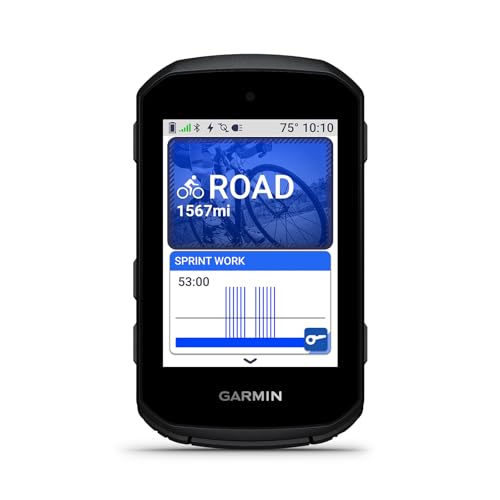 TOP CHOICEBest overallGarmin Edge® 850, Compact GPS Cycling Computer | Vivid Color Display,View on Amazon
- 2
 Best for button-only controlGarminVivid Color Display, Button Controls, Advanced Training & PerforView on Amazon
- 3
 Best for power-focused trainingGarmin Edge 1050 Premium Cycling ComputerView on Amazon
- 4
 Best for group rides and road hazardsGarmin Edge 850 GPS Cycling ComputerView on Amazon
Our Top Picks
The four units below are ordered by how well they fit a typical interval rider’s needs: structured workouts, clear in-ride targets and reliable sensor pairing. Every listing is a real Amazon product, and the comparison reflects manufacturer specifications and the feedback patterns owners commonly report rather than any hands-on testing of our own.
Quick Comparison
| Product | Best for | Key feature |
|---|---|---|
| Garmin Vivid Color Display Edge 850 (touchscreen) | Riders who want touch control during intervals | Touchscreen color display with built-in speaker |
| Garmin Vivid Color Display Edge 550 (button controls) | Riders who prefer physical buttons with gloves | Button-operated compact unit with performance insights |
| Garmin Edge 1050 Premium Cycling Computer | Power-based interval athletes | Large display with speed and cadence sensor support, bundled power bank |
| Garmin Edge 850 GPS Cycling Computer (MTB bundle) | Group riders and those who ride unfamiliar roads | GroupRide messaging and road hazard alerts |
GarminVivid Color Display, Touchscreen, Advanced Training & Performance Insights, Built-In Speaker Edge® 850
Garmin Edge® 850, Compact GPS Cycling Computer | Vivid Color Display, Touchscreen, Advanced Training & Performance Insights, Built-In Speaker
Best for: Riders who want a touchscreen-driven interval setup with a clear color display.
This is the most balanced choice here for structured interval sessions. It suits riders who build workouts in Garmin Connect, want to scroll through data screens quickly and appreciate audible cues from the built-in speaker when a step changes.
Key specs
- Compact GPS cycling computer with color display
- Touchscreen operation
- Built-in speaker
- Advanced training and performance insights
Pros
- Touchscreen makes changing data fields and starting intervals quick
- Built-in speaker helps when you cannot glance at the screen
- Training insights support tracking progress across repeated interval blocks
Cons
- Touch input can be less reliable when wet or wearing thick gloves
- Full advanced features depend on pairing with Garmin Connect and compatible sensors
Bottom line: A strong default pick for most riders who want a modern screen and audible interval cues without stepping up to the largest display.
GarminVivid Color Display, Button Controls, Advanced Training & Performance Insights Edge® 550
GarminVivid Color Display, Button Controls, Advanced Training & Performance Insights Edge® 550, Compact GPS Cycling Computer
Best for: Riders who prefer physical buttons for reliable control during hard efforts.
This unit fits riders who ride in cold, wet or gritty conditions, or who simply prefer buttons they can press without looking. The same training and performance feature set applies, with a compact body that suits minimal handlebar setups.
Key specs
- Compact GPS cycling computer
- Button controls
- Color display
- Advanced training and performance insights
Pros
- Button controls work reliably with gloves and in wet weather
- Compact size keeps the handlebar uncluttered
- Includes the same structured workout and performance insight features
Cons
- Navigating menus takes more button presses than a touchscreen
- Smaller display area means fewer data fields visible at once
Bottom line: The practical choice for riders who value button reliability and a compact footprint over touch convenience.
Garmin Edge 1050 Premium Cycling Computer
Wearable4U – Garmin Edge 1050 Premium Cycling Computer, Vivid Color Touchscreen Display, Built-in Speaker, Advanced Training with Garmin Speed and Cadence Sensors and Power Bank Bundle
Best for: Power-based interval training and riders who want the largest display in the lineup.
The Edge 1050 is aimed at serious riders who structure training around power and need to read multiple metrics at a glance during hard intervals. The bundle includes a power bank, which helps with long rides and multi-day use.
Key specs
- Vivid color touchscreen display
- Built-in speaker
- Compatible with Garmin speed and cadence sensors
- Includes a power bank in this bundle
Pros
- Large, vivid display suits multi-field layouts during intervals
- Sensor compatibility supports power and cadence-based workouts
- Power bank in the bundle adds practical battery support on long sessions
Cons
- Larger body is less discreet and heavier than compact models
- Premium feature set is more than casual riders need
Bottom line: Best for riders who train by power and want maximum screen real estate during structured efforts.
Garmin Edge 850 GPS Cycling Computer
Garmin Edge 850 GPS Cycling Computer, Compact 2.7" Touchscreen Color Display, Advanced Training & Stamina Insights, GroupRide Messaging, Road Hazard Alerts, ClimbPro, Garmin Pay, MTB Metrics Bundle
Best for: Group ride participants and riders who want road hazard warnings alongside interval training.
This bundle adds social and safety features to the standard Edge 850 platform. It suits riders who join group rides and want interval data and ride-safety alerts on one unit.
Key specs
- Compact 2.7-inch touchscreen color display
- Advanced training and stamina insights
- GroupRide messaging
- Road hazard alerts and ClimbPro
- MTB metrics included in the bundle
Pros
- GroupRide messaging keeps you connected on shared rides
- Road hazard alerts add a safety layer on unfamiliar routes
- Stamina insights help pace repeated efforts across a session
Cons
- Many bundled features go unused by riders who only do solo intervals
- Messaging and alerts rely on phone connectivity and app setup
Bottom line: A good fit for social riders and mixed road or trail riders who want interval training plus ride-safety tools in one device.
Buying Guide
Display size and readability
During a hard interval you have a second or two to read your target, so screen size and contrast matter. Larger displays show more fields at once, while compact screens are easier to mount on tight handlebars. Look for high contrast that stays readable in direct sun.
Good picks for this: Garmin Edge 1050 Premium Cycling Computer, GarminVivid Color Display Edge 850
Input method: touchscreen or buttons
Touchscreens allow faster menu navigation and scrolling, but they can misfire with wet hands or thick gloves. Physical buttons are dependable in poor weather. Decide based on the conditions you ride in most often.
Good picks for this: GarminVivid Color Display Edge 550, GarminVivid Color Display Edge 850
Workout builder and interval support
Confirm the unit can receive structured workouts with repeat blocks, target power or heart rate zones and automatic lap changes. The workout must sync from Garmin Connect, so check that your account and phone pairing work before buying.
Good picks for this: Garmin Edge 1050 Premium Cycling Computer, Garmin Edge 850 GPS Cycling Computer
Sensor compatibility
Interval targets are only as good as the data behind them. Check compatibility with a power meter, heart rate strap and cadence or speed sensors you already own. Power-based intervals need a reliable power source, and many riders find a heart rate strap more useful than a wrist reading during intense efforts.
Good picks for this: Garmin Edge 1050 Premium Cycling Computer, GarminVivid Color Display Edge 850
Battery life and power options
Long interval sessions and multi-hour rides drain batteries quickly, especially with a bright display and GPS running. Check the manufacturer’s stated battery life and whether the unit can charge in use. Bundles that include a power bank can cover longer outings.
Good picks for this: Garmin Edge 1050 Premium Cycling Computer, Garmin Edge 850 GPS Cycling Computer
Mounting and size
Measure your handlebar and stem clearance before you buy. Compact units fit crowded aero or time-trial setups, while larger units need more space and a secure mount. A computer that wobbles on rough roads makes it harder to read targets.
Good picks for this: GarminVivid Color Display Edge 550, GarminVivid Color Display Edge 850
Ride context and extra features
Group riding, mountain biking and unfamiliar-route riding each add needs such as messaging, hazard alerts or navigation. If you only ride solo on known roads, you may not need these extras, and a simpler unit may suit you better.
Good picks for this: Garmin Edge 850 GPS Cycling Computer, Garmin Edge 1050 Premium Cycling Computer
FAQ
Do I need a power meter for Garmin cycling interval training?
No. You can run structured intervals using heart rate zones or perceived effort, but power gives the most precise targets because it responds instantly to changes in effort. Heart rate can lag behind hard efforts, so many riders use power when they have it and heart rate when they do not.
Can I build interval workouts on the Garmin Connect app?
Yes. Structured workouts are typically created in Garmin Connect and then sent to a compatible Edge unit. Check the current Garmin Connect workflow for your model, since menu names and sync steps can change with software updates.
Which Edge model is best for beginners?
A compact unit with a clear display, such as the GarminVivid Color Display Edge 550 or Edge 850, usually suits beginners well. Start with simple intervals and add power or advanced features once you are comfortable reading the screen.
Do touchscreens work with gloves?
Some touchscreens work with thin gloves, but thick winter gloves often do not register input. Owners in cold climates frequently prefer button models for this reason. Test your gloves before a long ride.
How long do Edge units last on a charge during intervals?
Battery life varies with screen brightness, GPS use and sensor connections. Check the manufacturer’s rated battery life for the specific model and plan for a charge or power bank on rides longer than your rated time.
Is an interval workout safe for everyone?
High-intensity intervals are demanding and are not suitable for everyone, particularly people with heart conditions or other health concerns. Consult a doctor or qualified coach before starting a new hard training program.
Conclusion
For most riders doing Garmin cycling interval training, the GarminVivid Color Display Edge 850 is the most balanced starting point, offering a touchscreen, a built-in speaker and solid training insights. Riders who prefer buttons in cold or wet weather will find the Edge 550 more practical. Power-focused athletes who want the largest display and a bundled power bank should look at the Edge 1050, while group riders who value messaging and road hazard alerts may prefer the Edge 850 MTB bundle. Match the unit to your sensors, weather and ride style rather than the feature list alone.
Sources
- Guidance on physical activity intensity and safe exercise levels for adults (cdc.gov)
- Professional guidelines on exercise intensity, training zones and safety (acsm.org)
- Bicycle safety information, including equipment and mounting safety (cpsc.gov)
Related reading
- Interval Training in Cycling: A Step-by-Step Guide to Faster Rides
- Interval Training for Cycling Endurance: A Step-by-Step Guide
- Interval Training Running Garmin: Set Up Structured Workouts That Work
- High Intensity Interval Training Indoor Cycling: A Practical Guide (2026)
- High Intensity Interval Training Cycling: A Step-by-Step Guide for Faster Riding
- High Intensity Interval Training Cycling Workouts: 6 Sessions for Faster Riding
- Best GPS Watches for Interval Training
About Owen Palmer
Owen Palmer is part of our editorial team and reviews and edits our speed & interval running guides, checking product details against manufacturer specifications and owner feedback.